Unity AI NPC Tools: When Behavior Trees, GOAP, Utility AI, and LLM NPCs Make Sense
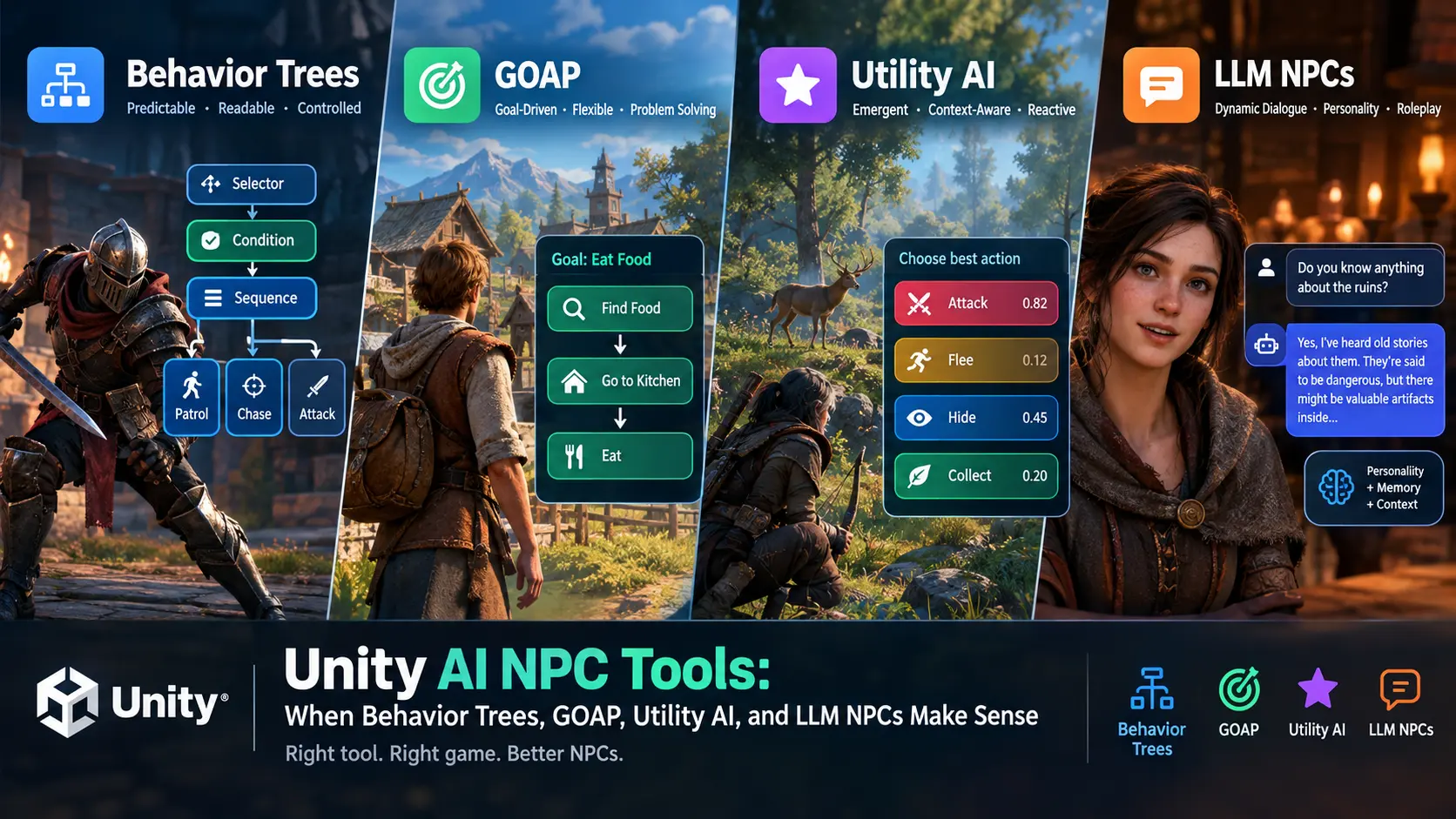
Choosing the right AI system is one of the most important decisions in Unity NPC development. Behavior Trees are best for readable, controlled actions; GOAP for goal-driven agents; Utility AI for emergent, context-aware behavior; and LLM NPCs for dynamic dialogue and personality. The best choice depends on your game’s scale, gameplay depth, and how predictable you need your NPCs to be.
Unity’s Asset Store includes both free and commercial AI tools, including behavior-tree frameworks, GOAP systems, Utility AI frameworks, and LLM-powered NPC solutions.
Quick Recommendation
| NPC type | Best AI approach | Why |
|---|---|---|
| Enemy patrol, combat, boss | Behavior Tree | Predictable, debuggable, designer-friendly |
| Sims, survival NPCs, colony agents | GOAP | Agents choose actions to satisfy goals |
| Open-world NPCs, crowd AI, tactical enemies | Utility AI | Scores many options and reacts to changing context |
| Story-driven companion or conversational NPC | LLM NPC | Natural dialogue, memory, personality, improvisation |
| Large-scale simulation | Utility AI + DOTS/ECS | Better suited to many agents |
Behavior Trees: The Reliable Default
A Behavior Tree (BT) organizes NPC logic into a hierarchy of conditions, actions, selectors, sequences, and decorators. It is the most practical choice when you need NPCs to behave consistently and be easy for designers to debug.
Use behavior trees when:
- You are building enemies, guards, bosses, companions, or turret AI.
- You need predictable combat states such as patrol, chase, attack, retreat, and heal.
- Designers must edit AI without deep programming knowledge.
- You want strong debugging and reusable behavior modules.
Unity’s built-in Behavior package is a graph-based behavior-tree tool with plain-language nodes, reusable subgraphs, C# integration, and real-time Play Mode debugging. For a more mature third-party option, Behavior Designer – Behavior Trees for Everyone is a widely used paid behavior-tree asset for Unity.
Recommended assets:
- Unity Behavior — Unity’s official graph-based behavior-tree solution.
- Behavior Designer – Behavior Trees for Everyone — a mature, designer-focused behavior-tree framework.
- Behavior Designer – Movement Pack — movement-focused tasks for Behavior Designer.
Best for: action games, stealth games, RPG enemies, tower defense, boss fights, and any project where AI must remain understandable.
GOAP: Goal-Oriented NPCs
GOAP (Goal-Oriented Action Planning) lets an NPC select a sequence of actions to achieve a goal. Instead of manually scripting every path, you define goals, actions, preconditions, and effects; the planner figures out the order.
Use GOAP when:
- NPCs have clear goals such as “eat food,” “rest,” “collect resources,” or “escape danger.”
- You want flexible behavior without creating a separate tree for every situation.
- Your world has many interacting objects and states.
- You want NPCs to solve problems dynamically.
For example, a hungry villager may plan: find food → go to kitchen → eat. If the kitchen is locked, the planner can choose another valid route if one exists.
Recommended assets:
- Goap by CrashKonijn — a free GOAP framework for Unity.
- GOAP AI Engine — a commercial GOAP-focused Unity asset.
Best for: survival games, life-simulation games, colony builders, RPG townsfolk, strategy agents, and sandbox worlds.
Utility AI: Emergent and Context-Aware Behavior
Utility AI gives every possible action a score based on the NPC’s current situation. The agent evaluates options such as attack, flee, heal, patrol, or collect loot, then chooses the highest-scoring action.
Unlike behavior trees, Utility AI does not follow one fixed branch. It continuously weighs needs, threats, distances, health, resources, personality traits, and target quality. This makes it excellent for creating NPCs that feel less scripted and more alive.
Use Utility AI when:
- You want emergent behavior rather than a fixed decision flow.
- Enemies should react intelligently to changing combat conditions.
- You have many competing needs, such as hunger, safety, socializing, and work.
- You need AI that selects both an action and the best target.
Utility Intelligence is a Utility AI framework that evaluates all possible decisions and chooses the highest-scoring one; it also scores decisions per target, which is useful for choosing the best enemy, item, or location. The framework includes an editor for designing considerations and decisions, plus a decision-making preview feature.
Recommended assets:
- Utility Intelligence – v2 (GO) — GameObject-based Utility AI framework.
- Utility Intelligence (ECS) v1 — DOTS/ECS-focused Utility AI for densely populated scenes.
- Utility AI — a lower-cost Utility AI option.
Best for: open-world games, immersive sims, tactical AI, wildlife systems, crowd behavior, and games where NPCs should feel autonomous.
LLM NPCs: Dynamic Dialogue and Personality
LLM NPCs use large language models to generate dialogue, interpret player input, maintain personality, and sometimes trigger in-game actions. They are not a replacement for gameplay AI; they are best treated as a dialogue and roleplay layer on top of a deterministic system.
Use LLM NPCs when:
- Players can speak or type freely to NPCs.
- You want non-repetitive conversations and character-driven roleplay.
- Your game has quest hints, rumors, negotiation, interrogation, or social gameplay.
- You can control cost, latency, safety, and output reliability.
Avoid using an LLM to decide core combat logic or mission-critical progression. Instead, let the LLM produce dialogue and intent, then map that intent to validated gameplay actions through a behavior tree, GOAP planner, or Utility AI system.
Recommended assets:
- Local, On-Device LLM for NPCs – GladeCore — an on-device LLM option for NPC dialogue and intelligence.
- Convai NPC AI Engine — an NPC AI engine covering dialogue, actions, voice, and lipsync.
Best for: narrative RPGs, interactive fiction, social sims, VR experiences, educational games, and AI companions.
Hybrid AI: The Best Real-World Approach
Most polished games do not rely on a single AI method. A strong Unity NPC architecture often combines systems:
- Utility AI decides what the NPC wants to do.
- GOAP creates a plan for how to achieve it.
- Behavior Tree executes reliable actions such as moving, attacking, animating, and interacting.
- LLM handles free-form conversation, personality, and player-facing dialogue.
For example, a medieval townsperson may use Utility AI to decide that socializing is more important than working. GOAP plans a visit to the tavern. A behavior tree handles navigation, animations, and interactions. If the player speaks to them, an LLM generates dialogue while the gameplay AI remains stable.
Performance and Cost Considerations
| System | Performance cost | Design complexity | Predictability |
|---|
| System | Performance cost | Design complexity | Predictability |
|---|---|---|---|
| Behavior Tree | Low to medium | Low to medium | High |
| GOAP | Medium | Medium to high | Medium |
| Utility AI | Medium to high | Medium to high | Medium |
| LLM NPC | High, especially cloud-based | High | Low unless constrained |
For large crowds, consider DOTS/ECS-based AI. Utility Intelligence (ECS) is designed for Unity’s Data-Oriented Tech Stack and targets scenes with many intelligent agents. For cloud LLMs, always plan for API cost, network latency, offline behavior, moderation, and fallback dialogue.
Which Should You Choose?
Choose based on your design goal:
- Choose Behavior Trees if you need dependable, readable AI.
- Choose GOAP if NPCs must pursue goals and solve problems.
- Choose Utility AI if you want reactive, emergent, personality-driven behavior.
- Choose LLM NPCs if conversation is central to the experience.
- Combine systems when your game needs both believable decisions and reliable gameplay execution.
For most Unity projects, start with a behavior tree. Add GOAP when NPCs need autonomy, add Utility AI when decisions become too complex, and add an LLM only when natural conversation creates real player value. Unity’s Asset Store provides assets across all of these categories, so you can prototype before committing to a full architecture.